CloudStation
  • How it works
  • Use cases
  • Solo foundersAn assistant that answers your customersStartupsSales, support and research without new hiresAgencies and studiosMore client work from the same teamCTOsAgents behind your own softwareEnterpriseThe whole platform on your own servers

    Industries

    Media and entertainmentResearch and academiaHealthcareFinancial servicesEducationE-commerce and retail
  • Templates
  • Pricing
  • Blog
  • Changelog
Start with Charlie
  • How it works
  • Use cases
  • Templates
  • Pricing
  • Blog
  • Changelog

Built for

  • Solo founders
  • Startups
  • Agencies and studios
  • CTOs
  • Enterprise

Industries

  • Media and entertainment
  • Research and academia
  • Healthcare
  • Financial services
  • Education
  • E-commerce and retail
Start with Charlie

Template store

Ready-made apps, set up by Charlie.

Databases, CRMs, analytics, support desks and workflow tools. CloudStation hosts each one with its own address, storage and logs. Deploy an app yourself, or ask Charlie to set it up for your team.

Browse the appsStart with Charlie
Template storeMost deployed
  1. Picked from the store
  2. Set up by Charlie
  3. Running

The catalog

Search the apps, or browse by category.

Sorted by how often each app has been deployed. Open one to read what it does and deploy it.

How it works

From the store to a working address.

  1. 01

    Pick an app

    Search by name or open a category. Each page says what the app does and how many times it has been deployed.

  2. 02

    Deploy it yourself

    Deploy opens the template in your CloudStation workspace. Fill in the settings it asks for and start it.

  3. 03

    Or ask Charlie

    Tell Charlie which app you want and what your team will use it for. Charlie sets it up and reports back in the thread.

  4. 04

    Share the address

    The app gets its own web address. Point your own domain at it when you want, and CloudStation sets up SSL.

Running today

A sales team's CRM runs on one of these apps.

Twenty CRM is in the store. One sales team runs it on CloudStation, and eight agents work in it.

They find companies, research them, find the decision maker and draft the first email. A person on the team approves every email.

AI CRM for a sales team, on Twenty

  1. 01Company scout
  2. 02Account researcher
  3. 03People finder
  4. 04Outreach writer
  5. 05Follow-up keeper
  6. 06Daily reporter
  7. 07Product expert
  8. 08Coordinator

A person approves each email before it is sent.

Hosting

What every app gets.

The same hosting your own apps get when Charlie builds them.

  • Data that survives restarts

    A storage volume keeps the app's data across restarts and redeployments.

  • Logs in your workspace

    Read the app's logs from your workspace when something looks wrong.

  • Every deployment listed

    The deployment history shows what changed and when.

  • From 1 app to 16

    Basic hosts 1 app, Essential 4, Pro 9 and Team 16. Pricing has the current prices.

Questions

About the apps.

Who makes these apps?

Most are open-source projects, packaged so they start on CloudStation. Each template page shows who packaged it and links to the project when there is a link.

What does it cost to host one?

Hosting comes with the cloud plans. Basic runs 1 app, Essential 4, Pro 9 and Team 16. The pricing page has the current prices.

Can Charlie work inside the app once it runs?

That depends on the app. Charlie works with an app through its API or a connected tool, the way a sales team's eight agents work in their Twenty CRM. Ask Charlie about the app you have in mind before you deploy it.

Is my data kept when the app restarts?

Yes. Data on the app's storage volume stays through restarts and redeployments. A volume is not a backup, and deleting the app deletes its data.

The app I need is not in the store. What now?

CloudStation also runs apps from a Docker image or a Git repository. Tell Charlie what you need and it can deploy one, or build the tool for you.

Tell Charlie which app your team needs.

Name the app and what it is for. Charlie sets it up on CloudStation, and your team opens it at its own address.

Start with Charlie
CloudStation

Charlie runs a team of AI specialists on CloudStation. Work starts from a customer message, a schedule or your own app, and Charlie asks you only when it matters.

Products
  • How it works
  • Use cases
  • Tools
  • Pricing
  • Enterprise
Resources
  • Template Store
  • Use case videos
  • Changelog
  • Blog
  • Careers
  • FAQ
Legal
  • Privacy Policy
  • Terms & Conditions
  • Refund Policy
  • Cancellation Policy
  • Data Processing Agreement

©2026 CloudStation

Template storeMost deployed
  • Evolution Api
  • Bolt.new
  • N8N Advanced
  • N8N Light
  • Redis
  • PostgresSQL
  1. Picked from the store
  2. Set up by Charlie
  3. Running

https://evolution-api-•••.cloud-station.apphttps://bolt-•••.cloud-station.apphttps://n8n+worker-•••.cloud-station.apphttps://n8n-•••.cloud-station.apphttps://redis-•••.cloud-station.apphttps://postgres-•••.cloud-station.app

15 apps

All apps 79Dev & Deployment 37AI & Automation 30Data & Databases 20Customer & Marketing 15Communication 14Business & Finance 7Security & Auth 3Content & CMS 2Other 1
  • Linkstack

    CloudStation

    Optimize Online Link Management with LinkStack on Cloudstation Deploy LinkStack on Cloudstation for a customizable, privacy-focused alternative to Linktree. This open-source platform revolutionizes link management and sharing, allowing full control by hosting links on your own server. Ideal for businesses and organizations, LinkStack supports self-hosting to safeguard user data, offers drag-and-drop simplicity for easy implementation, and ensures efficient online link management without the hassle of complex coding. Start with LinkStack on Cloudstation for a secure, user-friendly link management solution.

    2 deployments

  • OpenSEO

    CloudStation

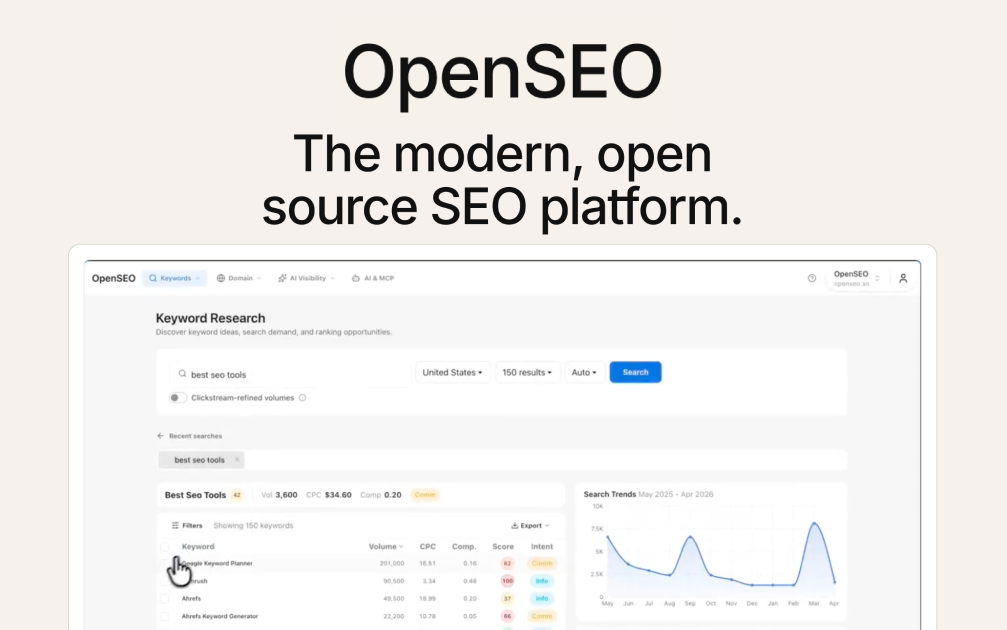
    OpenSEO Deploy OpenSEO on CloudStation Without Managing Servers What is OpenSEO? OpenSEO is an open-source SEO tool and a self-hosted alternative to Semrush and Ahrefs. It covers keyword research, rank tracking, competitor insights, backlinks, site audits, and AI search visibility in one focused interface. There is no subscription: you connect your own DataForSEO account and pay only for the data you actually use. Deploy OpenSEO on CloudStation when you want your own SEO tool without setting up Docker, a reverse proxy, SSL, or a login layer by hand. This template ships OpenSEO 0.1.9 behind a password-protected login, with a persistent volume for your projects, saved keywords, and audit history, so your data survives restarts and redeploys. ⚠️ Before you start: OpenSEO needs a DataForSEO API key to show any SEO data. New DataForSEO accounts include $1 of free credit, and the minimum top-up is $50. Your login username is admin , and a unique password is generated for each deployment and stored in the service's environment variables. Best For and Not Best For Best for: founders, marketers, freelancers, and small agencies who do keyword research and rank tracking a few times a month and don't want to pay for a full Semrush or Ahrefs subscription. It is also a strong fit for anyone who wants AI agents like Claude Code or Codex to run SEO research directly. Not best for: large teams that need separate user accounts and permissions, fully automated daily rank tracking out of the box, or the massive historical backlink index of an enterprise SEO suite. Why Teams Choose OpenSEO Pay for Data, Not Seats No monthly subscription: pay DataForSEO directly, per request Self-hosting avoids the markup the hosted OpenSEO service adds on top of DataForSEO costs Open source under the MIT license, so you are never locked in The SEO Workflows That Matter Keyword research with search volume, difficulty, and SERP inspection Rank tracking for your saved keywords Competitor and domain research, plus a backlink overview Site audits with Lighthouse performance checks Shareable SEO reports for clients and stakeholders AI Search Visibility See how often your brand is mentioned in ChatGPT and Google AI answers Track share of voice against competitors in AI search Find the sources AI answers cite, so you know which pages to earn mentions on Built for AI Agents Built-in MCP server: connect Claude Code, Claude Desktop, Cursor, or Codex to your own instance Ready-made agent skills for keyword research, competitor analysis, site audits, local SEO, and SEO reports Optional in-app SEO assistant powered by OpenRouter Optional Google Search Console connection for real performance and URL inspection data OpenSEO vs Alternatives OpenSEO vs Semrush : Choose OpenSEO when you use a handful of core workflows and want to pay per request instead of a monthly seat. OpenSEO vs Ahrefs : Choose OpenSEO for keyword research, rank tracking, and backlink overviews without a subscription. Choose Ahrefs if you need its full historical backlink index. OpenSEO vs the hosted OpenSEO service : Choose self-hosting on CloudStation to pay DataForSEO directly and keep your SEO data on infrastructure you control. Why Deploy OpenSEO on CloudStation? Safe to put on the internet : OpenSEO's own Docker setup has no login and is meant for private networks. This template adds a password-protected login in front of the app and the MCP endpoint, so it is safe on a public web address. Fast restarts : The app is built once when the image is built, instead of on every start, so it comes back in seconds after a restart. Data that persists : A dedicated volume keeps your projects, keywords, and audit history across restarts and redeploys. Pricing and Plan Fit 🚀 CloudStation Basic Plan : from $17.99/month for a standard marketplace deployment ✓ OpenSEO 0.1.9 with a password-protected login ✓ 5GB persistent storage ✓ Custom domains ✓ Free SSL ✓ Docker support Deployment note: This template deploys one service with 2GB of memory. SEO data costs are separate and billed by DataForSEO based on the requests you make. Common OpenSEO Use Cases Keyword research for content : Find keywords worth targeting before you write. Rank tracking : Check where your pages rank for the keywords you care about. Competitor analysis : See which keywords and pages drive a competitor's traffic. Technical site audits : Find broken pages and slow pages that hold your rankings back. AI search visibility : Measure how often ChatGPT and Google AI mention your brand. Agent-driven SEO : Let Claude Code or Codex research keywords and pull rankings through MCP. FAQ Is OpenSEO free? The software is free and open source under the MIT license. You pay for the CloudStation resources it runs on and for the DataForSEO data you use. What does DataForSEO cost? DataForSEO is pay-as-you-go. New accounts get $1 of free credit, and the minimum top-up is $50. You only pay for the requests OpenSEO makes on your behalf. What are the login credentials after deploying? The username is admin. The password is generated uniquely for each deployment and stored in the service's environment variables. Can I connect Claude Code or other AI agents? Yes. Add your OpenSEO web address followed by /mcp as an MCP server in Claude Code, Cursor, Codex, or Claude Desktop, and sign in with the same username and password. Does rank tracking run automatically? Not in this self-hosted version. Scheduled rank checks only run on OpenSEO's Cloudflare hosting, so you trigger checks from the Rank Tracking page. Will my data survive a restart? Yes. This template mounts a persistent volume for OpenSEO's database, so projects, keywords, and audit history are kept across restarts and redeploys. Can several people use it? Yes, by sharing the login, but everyone works in the same workspace. OpenSEO's self-hosted mode has a single admin account and no per-user permissions. Start Doing SEO With OpenSEO If you are searching for self-host OpenSEO , OpenSEO hosting , an open-source SEO tool , a self-hosted Semrush alternative , a cheap Ahrefs alternative , or an SEO MCP server for AI agents , this CloudStation template is built for that intent. Launch OpenSEO, connect DataForSEO, and start researching keywords in an environment you control. Deploy OpenSEO Now → Pay-as-you-go SEO data. Your own instance. Zero server management. OpenSEO on CloudStation: open-source, self-hosted SEO research for you and your AI agents, a Semrush and Ahrefs alternative without running the deployment stack by hand.

    2 deployments

  • Corteza

    CloudStation

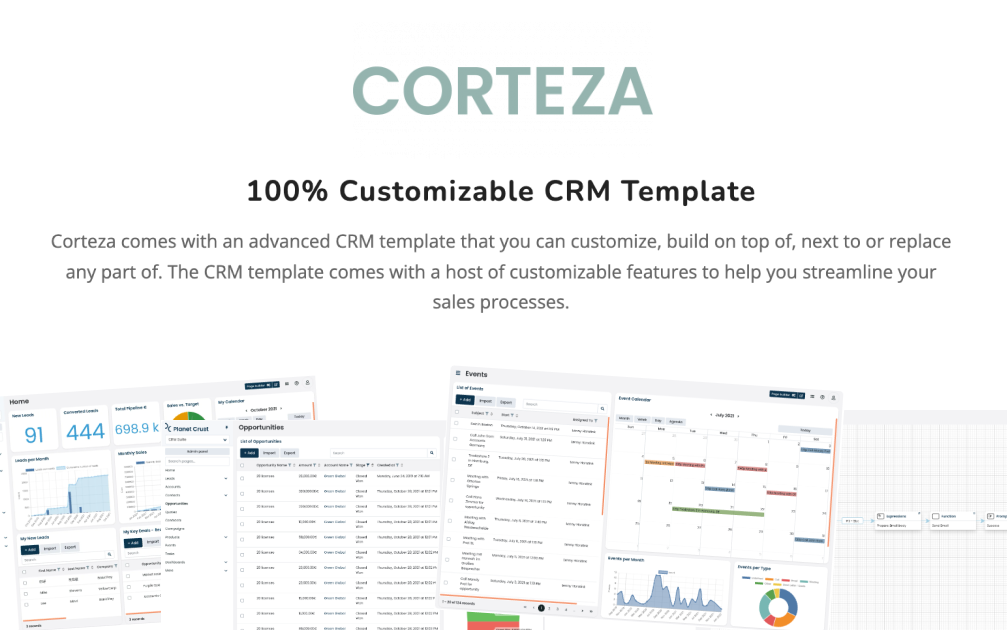
    Transform Your Enterprise with Corteza on Cloudstation Deploy Corteza on Cloudstation to elevate your business processes with the ultimate open-source digital work platform. Corteza is designed to empower organizations with a suite of powerful tools for CRM, workflow automation, low-code application development, and data integration, all within a secure, unified environment. This platform facilitates the creation of custom digital ecosystems, enabling businesses to manage data, automate processes, and enhance collaboration efficiently. Hosting Corteza on Cloudstation's scalable and secure infrastructure ensures that enterprises of all sizes can leverage its full potential without compromise. With Corteza, you gain the flexibility to tailor your digital workspace to your exact needs, driving innovation and efficiency across your operations. Opt for Corteza on Cloudstation for a comprehensive solution that simplifies complex business challenges through advanced digital transformation.

‹12›